
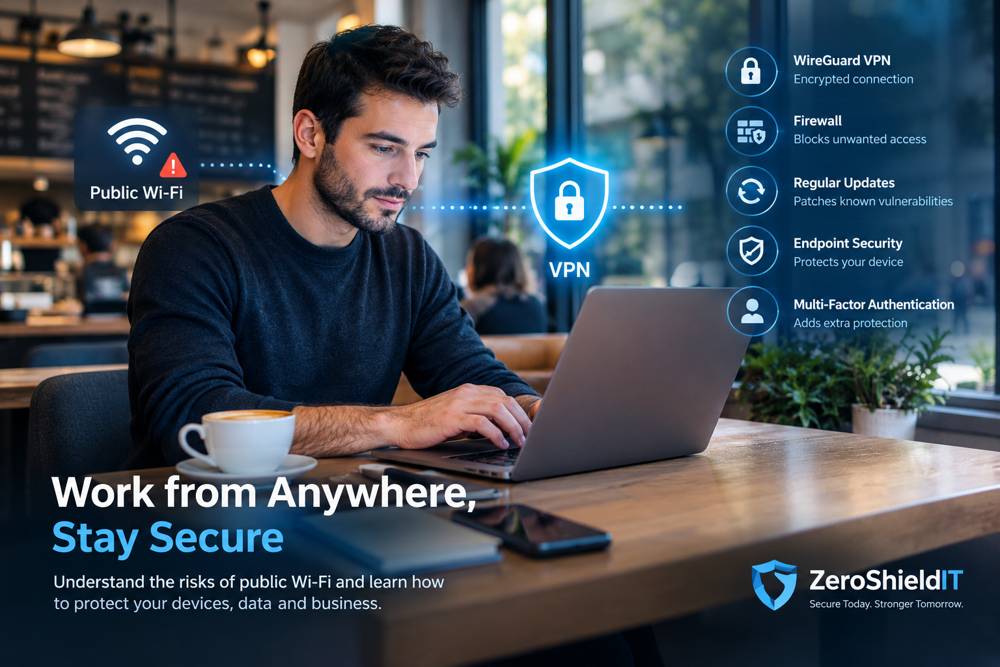
Public Wi-Fi Security: Risks, Prevention, and How to Protect Your Business
Working from a café, hotel, airport, or coworking space has become increasingly common. Public Wi-Fi allows employees, freelancers, and business owners to stay productive without being tied to an office. However, connecting to an unfamiliar wireless network can introduce cybersecurity risks that many users underestimate.
From fake Wi-Fi hotspots and phishing attacks to vulnerable devices and insecure network configurations, public Wi-Fi can create opportunities for cybercriminals. The good news is that using public Wi-Fi does not automatically put your data at risk. With the right security measures, you can significantly reduce your exposure and work remotely with greater confidence.
In this guide, we explain the main public Wi-Fi security risks, practical ways to protect your devices, and how professional IT security solutions can help businesses maintain a safer remote-working environment.
Why Can Public Wi-Fi Be Dangerous?
Public Wi-Fi networks are designed to provide convenient internet access to multiple users. Unlike a private business network, however, you may have little information about who manages the network, how it is configured, or what security controls are in place.
A legitimate café Wi-Fi network is not necessarily unsafe. Modern encryption technologies, secure websites, properly configured devices, and firewalls provide substantial protection. The risk increases when networks are misconfigured, attackers impersonate legitimate hotspots, or users connect vulnerable devices and interact with fraudulent websites.
Understanding these risks is the first step toward protecting your personal information and business data.
1. Fake Wi-Fi Hotspots and Evil Twin Attacks
One potential threat is an Evil Twin attack, in which an attacker creates a fraudulent Wi-Fi hotspot that imitates a legitimate network.
For example, a customer visiting a café might see two similarly named networks. One belongs to the café, while the other is controlled by an attacker. If the customer connects to the fraudulent hotspot, the attacker may attempt to monitor connection metadata, interfere with network traffic, or redirect the customer to malicious websites.
Modern HTTPS encryption generally prevents an attacker from simply reading passwords and private messages exchanged with properly authenticated websites. However, a fraudulent hotspot can still facilitate phishing, malicious redirects, and other attacks.
How to reduce the risk:
- Confirm the correct Wi-Fi network name with the establishment's staff.
- Avoid connecting to unfamiliar hotspots simply because they have a familiar name.
- Be cautious when a Wi-Fi login page requests sensitive information, such as your email password.
- Never ignore browser security or certificate warnings.
- Use a reputable VPN when appropriate to protect traffic between your device and the VPN endpoint.
2. Man-in-the-Middle Attacks and Traffic Interception
A man-in-the-middle attack occurs when an attacker attempts to intercept or manipulate communications between two parties.
On an insecure network, an attacker may be able to observe unencrypted traffic or attempt to interfere with connections. Older applications and websites that do not properly encrypt communications are particularly concerning because sensitive information may be exposed in transit.
Fortunately, modern websites use HTTPS to encrypt communications between the browser and the website. This significantly reduces the risk of someone on the same Wi-Fi network reading passwords, payment information, and other sensitive data transmitted through a properly configured connection.
However, encryption does not protect users from every attack. A criminal can still create a convincing fake login page, send a phishing link, or exploit a vulnerable application.
How to reduce the risk:
- Use HTTPS websites and official applications.
- Keep your browser and applications updated.
- Use multifactor authentication (MFA) on important accounts.
- Avoid entering credentials into websites reached through suspicious links or unexpected Wi-Fi login prompts.
- Consider a properly configured VPN to add another layer of protection on untrusted networks.
3. Attacks Against Laptops and Other Connected Devices
Another concern is the possibility of an attacker attempting to discover and access devices connected to the same local network.
Depending on the network configuration, an attacker might scan for exposed services, identify open network ports, or look for vulnerable applications. Devices with unnecessarily exposed file-sharing services, weak authentication, outdated software, or misconfigured firewalls may be at greater risk.
For example, a Windows laptop with exposed file-sharing services could attract unwanted connection attempts on a poorly isolated public network. Successful access would still depend on the device's configuration, authentication controls, and the presence of exploitable weaknesses.
How to reduce the risk:
- Set untrusted Wi-Fi connections to the Public network profile in Windows.
- Keep Microsoft Defender Firewall enabled.
- Disable unnecessary file and printer sharing.
- Install Windows security updates and application patches promptly.
- Use reputable endpoint protection and keep real-time protection enabled.
- Disable automatic connections to unfamiliar open Wi-Fi networks.
These measures help reduce your device's exposure to other users on the network. They should be combined with secure authentication and regular maintenance.
4. The Role of a VPN in Public Wi-Fi Security
A Virtual Private Network (VPN) establishes an encrypted connection between your device and a VPN endpoint. This helps protect the traffic carried through the VPN from being read or modified by someone monitoring the local Wi-Fi connection.
For remote workers and businesses, a properly configured VPN can provide an additional layer of protection when accessing company systems outside the office.
WireGuard VPN
WireGuard is a modern VPN protocol designed to provide secure, encrypted network connections using contemporary cryptographic techniques.
When correctly configured, WireGuard can protect communications between authorized devices. For example, an employee working from a café can establish an encrypted connection to a company's network before accessing approved internal resources.
This is particularly useful when employees need secure access to file servers, internal applications, or other business resources while working remotely.
Tailscale for Secure Device Connectivity
Tailscale uses WireGuard to create encrypted connections between authorized devices. It simplifies secure connectivity by providing device authentication and access-control features without requiring every business to build and maintain a traditional VPN infrastructure from scratch.
Depending on the configuration, businesses can use Tailscale to connect employees' laptops to approved company devices and services while restricting access to resources that each user does not need.
What a VPN Cannot Do
A VPN is an important security measure, but it is not a complete cybersecurity solution.
- It cannot prevent every phishing attack or fraudulent login page.
- It does not automatically protect a device that is already infected with malware.
- It does not replace operating-system updates, endpoint protection, or multifactor authentication.
- It only protects the traffic routed through the VPN tunnel.
- It does not automatically make every company resource accessible through a secure connection; routing, authentication, and access policies must be configured correctly.
For these reasons, businesses should treat VPN technology as one component of a broader security strategy rather than a standalone solution.
5. Essential Security Measures for Remote Workers
Whether you work from a café, hotel, coworking space, or home office, following a consistent security routine can help reduce your exposure to common threats.
Keep Your Operating System and Applications Updated
Security patches address known vulnerabilities that attackers may otherwise exploit. Install updates for Windows, browsers, messaging applications, and other software regularly. Avoid postponing important security updates unnecessarily.
Enable Firewall and Endpoint Protection
A properly configured firewall helps restrict unwanted network connections, while endpoint protection helps detect and block malicious software and other threats. Keep Microsoft Defender or another reputable endpoint security solution active and configured appropriately.
Use Multifactor Authentication
MFA adds an additional verification step when signing in to an account. Even if an attacker obtains a password, additional authentication requirements can make unauthorized access more difficult. For administrators and business accounts, phishing-resistant authentication methods are particularly valuable where supported.
Protect Your Business Connections with a VPN
Use an approved VPN when accessing internal company resources over an untrusted network. Confirm that the connection is established and that the intended traffic is routed through it. Businesses should also restrict access to authorized devices and users.
Be Careful with Files, Links, and Login Requests
Do not open unexpected attachments or install unfamiliar software simply because a website or message tells you to. Verify suspicious requests through a trusted channel, particularly when they involve business credentials or confidential information.
Protect Physical Access to Your Laptop
Cybersecurity is not limited to network traffic. Position your screen to reduce the chance of someone viewing confidential information, lock your device when stepping away, and never leave it unattended in a public place.
6. How Businesses Can Secure Employees Working Remotely
For businesses, securing remote work requires more than asking employees to be careful when connecting to public Wi-Fi. A consistent security strategy should protect company devices, identities, applications, and data wherever employees work.
A practical remote-working security strategy may include:
- Managed endpoint security: Protect laptops and other supported devices with properly configured antivirus, endpoint detection, and security policies appropriate to the business.
- Secure remote access: Use WireGuard, Tailscale, or another suitable VPN solution to provide controlled access to internal resources.
- Identity and access management: Enforce MFA, strong authentication, and least-privilege access wherever possible.
- System maintenance: Keep operating systems, applications, and firmware updated.
- Firewall configuration: Restrict unnecessary inbound connections and review device and network security settings.
- Backup and recovery: Maintain appropriate backups and test recovery procedures so that important business data can be restored after an incident.
- Security awareness: Train employees to recognize phishing, fraudulent login pages, suspicious attachments, and other common attack techniques.
The right combination depends on the company's size, existing infrastructure, applications, and remote-access requirements. Security measures should be selected and configured according to the actual risks rather than implemented as a one-size-fits-all solution.
Is Public Wi-Fi Safe Enough for Business Use?
Public Wi-Fi can be suitable for everyday browsing and many remote-working tasks when appropriate security measures are in place. A fully updated laptop, an enabled firewall, properly encrypted applications, and a correctly configured VPN can substantially reduce the risks associated with an untrusted network.
However, no single security measure eliminates every threat. A VPN cannot prevent someone from stealing credentials through phishing, and an encrypted connection cannot compensate for a vulnerable or compromised laptop.
For highly sensitive work, consider whether the environment is appropriate for the task. A trusted mobile hotspot may be preferable when the public network is questionable, while access to confidential company systems should always follow your organization's security policies.
How ZeroShieldIT Can Help Protect Your Business
At ZeroShieldIT, we help individuals and businesses in Lebanon improve their IT security and maintain more reliable technology environments. We understand that modern businesses need to work securely from offices, homes, and other locations without unnecessarily exposing their systems or information to cyber threats.
Our IT support and cybersecurity services can help you implement practical security measures tailored to your environment, including:
- Laptop and device security: Review Windows security settings, firewall configuration, update policies, endpoint protection, and other important security controls.
- Secure VPN implementation: Plan and configure suitable remote-access solutions, including WireGuard-based connectivity, according to your infrastructure and access requirements.
- Network and access security: Review network configurations, authentication practices, and access permissions to help reduce unnecessary exposure.
- Managed IT maintenance: Help keep supported systems updated, maintained, and configured according to agreed service requirements.
- Backup and disaster recovery: Implement appropriate backup strategies and recovery procedures to help protect important business data.
- Cybersecurity guidance: Identify practical improvements that help your employees work more safely and reduce avoidable security risks.
Whether you are a small business owner, a growing company, or a professional who regularly works remotely, we can help you evaluate your current setup and identify appropriate improvements.
Explore our Cybersecurity Solutions, learn about our Backup and Disaster Recovery Services, or discover our IT Consulting Services.
Final Thoughts: Work Anywhere, Stay Secure
Public Wi-Fi does not have to prevent you from working remotely. The key is understanding the risks and implementing the right protections before connecting to an unfamiliar network.
Keep your devices updated, enable your firewall, use secure applications, protect your accounts with multifactor authentication, and consider a properly configured VPN such as WireGuard when accessing business resources remotely.
Most importantly, do not leave your cybersecurity to chance. The right combination of device protection, secure connectivity, access controls, and ongoing IT maintenance can help reduce risk while allowing you to remain productive wherever your work takes you.
Need help securing your laptops, business network, or remote workforce? ZeroShieldIT can help you identify security gaps and implement practical IT and cybersecurity solutions for your needs in Lebanon.
Contact ZeroShieldIT to discuss securing your devices and business systems.
0 Comments
Leave a Comment
No comments yet. Be the first to share your thoughts!